

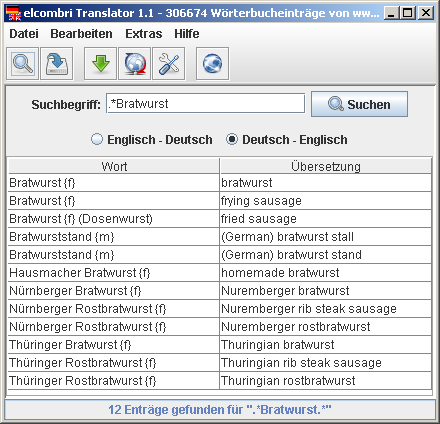
Der elcombri Translator ist ein kostenloses Offline-Wörterbuch für die Sprachen Deutsch und Englisch. Das Programm ist eine plattformunabhängige Java-Anwendung und läuft daher auf allen gängigen Betriebssystemen (Windows, Linux, MacOS, …). Die Wörterliste basiert auf dem Online-Wörterbuch dict.cc und enthält über 700.000 Einträge, die ohne eine Internetverbindung durchsucht werden können. Über die integrierte OnlineUpdate-Funktion kann der Wortschatz immer aktuell gehalten werden.
Downloade hier die aktuelle Version 1.1c
Wähle aus den folgenden Versionen die für dich passende aus. Zum Ausführen des elcombri Translators muss das Java Runtime Environment auf deinem Computer installiert sein.
Das Wörterbuch (Deutsch/Englisch) selbst ist nicht im Download enthalten! Dies muss mittels der OnlineUpdate-Funktion im Programm oder manuell von dict.cc heruntergeladen werden. Aktuell wird nur die Version „DE -> EN (Elcombri / outdated, cp1252)“ unterstützt.
Windows-Installer herunterladen
Portable Version für Windows herunterladen
JAR-Datei für andere Betriebssysteme herunterladen
Hilfe zur Installation und Verwendung
In der Online-Hilfe findest du wertvolle Hinweise zur Installation und zum Einsatz des elcombri Translators. Die Hilfe kannst du auch zur Offline-Nutzung herunterladen.
Komplette Hilfe als ZIP-Datei herunterladen
Quellcode
Der elcombri Translator ist ein privates OpenSource-Projekt unter der GNU GPL. Wenn du an dessen Implementierung interessiert bist oder Verbesserungen vornehmen möchtest, dann kannst du hier den Java-Quelltext herunterladen.